
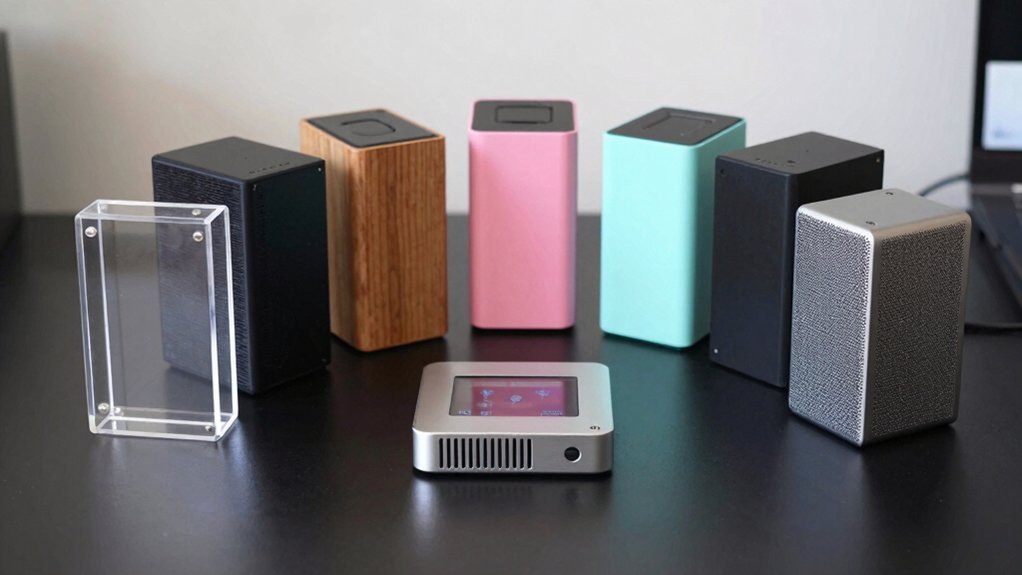
You’re setting up an OctoPrint server, and the case you choose will dictate how cool, quiet, and expandable your Pi stays. From dual‑fan aluminum enclosures to carbon‑fiber Zero shells, each option balances airflow, durability, and ease of access. Some even integrate power supplies and SSD mounts, while others focus on compact, rugged designs. The right fit can prevent overheating and simplify upgrades—so which features matter most for your 3‑D printing workflow?
| Miuzei Raspberry Pi 4 Fan Cooling Case with Power Supply. Aluminum Heatsinks |  | Best Cooling | Compatibility: Raspberry Pi 4 Model B (8 GB/4 GB) | Cooling Method: Fan + aluminum heatsinks | Material: Acrylic shell + aluminum heatsinks | CHECK ON AMAZON | Read Our Analysis |
| UCTRONICS Raspberry Pi Cluster Case with Fans and SSD Support |  | Cluster Pro | Compatibility: Raspberry Pi B, 2B, 3B, 3B+, 4B, 4B+ | Cooling Method: 2 × cooling fans (active) | Material: Aluminum metal enclosure | CHECK ON AMAZON | Read Our Analysis |
| Raspberry Pi Zero & Orange Pi Zero 2W Carbon Fiber Case | 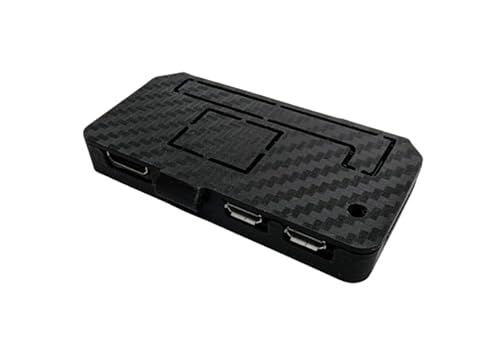 | Travel‑Ready | Compatibility: Raspberry Pi Zero (all models) & Orange Pi Zero 2W | Cooling Method: Passive (no fan) | Material: Carbon‑fiber‑look plastic | CHECK ON AMAZON | Read Our Analysis |
| Raspberry Pi 4 ABS Case with Fan and Removable Top | 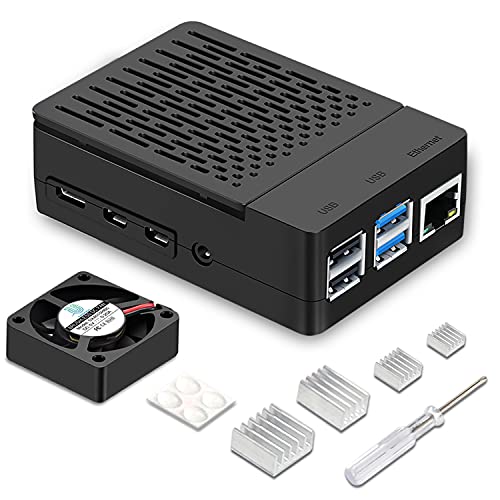 | Easy‑Access | Compatibility: Raspberry Pi 4 Model B | Cooling Method: 40 mm fan + heatsink (active) | Material: ABS plastic (black) | CHECK ON AMAZON | Read Our Analysis |
| Aluminum Heavy-Duty Case for Raspberry Pi 5 |  | Silent Passive | Compatibility: Raspberry Pi 5 (2 GB‑16 GB) | Cooling Method: Passive aluminum case (no fan) | Material: Aluminum (heavy‑duty) | CHECK ON AMAZON | Read Our Analysis |
| Argon NEO 5 M.2 NVMe PCIE Case for Raspberry Pi 5 with Built‑in Fan |  | NVMe‑Ready | Compatibility: Raspberry Pi 5 (M.2 NVMe) | Cooling Method: Built‑in fan + heatsink (active) | Material: Aluminum case | CHECK ON AMAZON | Read Our Analysis |
| UCTRONICS Raspberry Pi Cluster Enclosure with SSD PoE Fans |  | PoE‑Enabled | Compatibility: Raspberry Pi 5, 4B, 3B+, 3B, other B models | Cooling Method: 2 × cooling fans (active) | Material: Aluminum metal rack | CHECK ON AMAZON | Read Our Analysis |
| Arducam Raspberry Pi Camera Module with Case 5MP 1080P |  | Camera‑Ready | Compatibility: Raspberry Pi 5, 4, 3/3B+ (camera) | Cooling Method: No cooling (camera module) | Material: Acrylic case (plastic) | CHECK ON AMAZON | Read Our Analysis |
| ElectroCookie Raspberry Pi 4 Mini Tower Case with Fan | 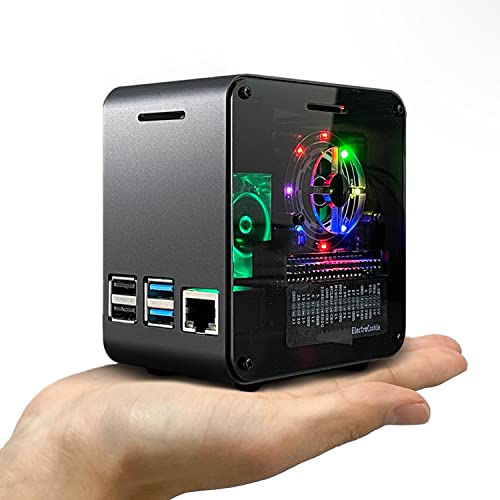 | RGB‑Lite | Compatibility: Raspberry Pi 4B | Cooling Method: 4000 rpm fan + heatsink (active) | Material: Aluminum body + acrylic cover | CHECK ON AMAZON | Read Our Analysis |
| Argon ONE V2 Aluminum Case for Raspberry Pi 4 | with Power Button and Fan |  | Power‑Safe | Compatibility: Raspberry Pi 4 | Cooling Method: 30 mm fan + heatsink (active) | Material: Aluminum case | CHECK ON AMAZON | Read Our Analysis |
More Details on Our Top Picks
Miuzei Raspberry Pi 4 Fan Cooling Case with Power Supply. Aluminum Heatsinks
Looking for a case that keeps your OctoPrint server cool while staying easy to assemble? The Miuzei Raspberry Pi 4 Fan Cooling Case wraps your board in a clear acrylic shell, letting you watch LEDs and status lights. It fits the 8 GB and 4 GB Pi 4 Model B, and all ports stay accessible—micro HDMI, USB, Ethernet, and micro‑SD. A 5 V 3 A Type‑C power supply with an on/off switch powers the unit, while a 30 mm fan and four aluminum heatsinks form a dual‑cooling system that keeps the CPU low under heavy loads. ETL certification protects against overvoltage and overcurrent, and the simple snap‑in design lets beginners assemble it in minutes. The sleek, transparent case also adds a modern look to any 3D‑printing workstation.
- Compatibility:Raspberry Pi 4 Model B (8 GB/4 GB)
- Cooling Method:Fan + aluminum heatsinks
- Material:Acrylic shell + aluminum heatsinks
- Power Supply Integration:5 V 3 A Type‑C supply with on/off switch
- Port Access:All Pi ports exposed (HDMI, USB, Ethernet, micro‑USB)
- Assembly Difficulty:Beginner‑friendly, snap‑fit fan/heatsink
- Additional Feature:Clear acrylic shell
- Additional Feature:On/Off switch
- Additional Feature:ETL safety certification
UCTRONICS Raspberry Pi Cluster Case with Fans and SSD Support
If you need a compact, metal‑rack solution that lets you stack four Raspberry Pi boards while keeping them cool and ready for SSD storage, the UCTRONICS Raspberry Pi Cluster Case is the obvious pick. Its aluminum enclosure measures 4.13 × 4.84 × 7.12 inches, offering a sturdy yet lightweight frame. Each 40 mm layer holds a Pi, and two built‑in fans keep temperatures low. You can mount four 2.5″ SSDs (up to 7 mm) for fast NAS‑style storage, and the side opening gives easy HDMI, audio, and power access. M4 hand screws let you stack cases without tools, while a front‑facing SD slot adapter keeps cards handy. This case streamlines cable management and looks tidy on any workbench.
- Compatibility:Raspberry Pi B, 2B, 3B, 3B+, 4B, 4B+
- Cooling Method:2 × cooling fans (active)
- Material:Aluminum metal enclosure
- Power Supply Integration:Rear‑mounted power flexibility (external supply)
- Port Access:Side opening for HDMI, audio, power; front‑accessible SD slot
- Assembly Difficulty:Easy, tool‑free M4 hand screws
- Additional Feature:Four‑layer metal rack
- Additional Feature:2.5″ SSD bays
- Additional Feature:PoE hat compatibility
Raspberry Pi Zero & Orange Pi Zero 2W Carbon Fiber Case
The carbon‑fiber case is perfect for anyone who wants a lightweight, rugged shell that still gives full access to the Pi Zero’s ports and GPIO—especially when building a compact OctoPrint server that’ll travel with you. Its precision cut‑outs expose HDMI, USB, and GPIO pins, so you can plug in a camera or sensor without hassle. Snap‑fit assembly means you’ll never need a screwdriver, and the snug fit holds the board securely. The carbon‑fiber look adds a premium vibe while keeping weight low, making it ideal for retro‑gaming rigs, robotics, smart‑home hubs, or tiny media servers that need durability on the go.
- Compatibility:Raspberry Pi Zero (all models) & Orange Pi Zero 2W
- Cooling Method:Passive (no fan)
- Material:Carbon‑fiber‑look plastic
- Power Supply Integration:No integrated supply (uses Pi power)
- Port Access:Cut‑outs for HDMI, USB, GPIO; camera mount
- Assembly Difficulty:Tool‑free snap‑fit installation
- Additional Feature:Carbon‑fiber look
- Additional Feature:Snap‑fit installation
- Additional Feature:GPIO camera access
Raspberry Pi 4 ABS Case with Fan and Removable Top
Need you need a compact, sturdy enclosure that keeps your Pi 4 cool while still giving instant access to the GPIO and camera ports, the iUniker ABS case with a 40 mm fan and removable top is a solid pick for any OctoPrint server build. The black ABS shell houses a 40 mm quiet fan and an integrated heatsink, dropping temperatures noticeably. You can snap the top off in seconds to plug cables or swap the camera without tools. It fits the Pi 4 Model B perfectly, measuring 4.72″ × 1.57″ × 2.36″ and weighing just 70 g. With two USB 2.0 ports, a one‑year warranty, and a 4.5‑star rating, it balances durability, cooling, and convenience.
- Compatibility:Raspberry Pi 4 Model B
- Cooling Method:40 mm fan + heatsink (active)
- Material:ABS plastic (black)
- Power Supply Integration:No integrated supply (uses Pi power)
- Port Access:Open access to GPIO, camera, ports (removable top)
- Assembly Difficulty:Simple removable top, screw‑less assembly
- Additional Feature:Removable top cover
- Additional Feature:40 mm quiet fan
- Additional Feature:ABS black body
Aluminum Heavy-Duty Case for Raspberry Pi 5
Looking for a case that keeps your Raspberry Pi 5 cool and safe while you run OctoPrint 24/7? This aluminum heavy‑duty shell acts like a silent refrigerator, pulling heat away with high‑conductivity stickers and a solid metal body. You’ll get full access to GPIO, Micro HDMI, USB, SD card, and power ports thanks to precise cutouts. Installation is straightforward; the included screwdriver, screws, and rubber feet make mounting a breeze. The package also supplies four heat‑conduction pads and a quick‑start guide, ensuring your Pi stays dust‑free, scratch‑proof, and fan‑free for continuous printing.
- Compatibility:Raspberry Pi 5 (2 GB‑16 GB)
- Cooling Method:Passive aluminum case (no fan)
- Material:Aluminum (heavy‑duty)
- Power Supply Integration:No integrated supply (uses Pi power)
- Port Access:Gaps for GPIO, micro‑HDMI, USB, SD, power
- Assembly Difficulty:Straightforward, includes screwdriver & screws
- Additional Feature:Passive metal cooling
- Additional Feature:Heat‑conducting stickers
- Additional Feature:Rubber feet included
Argon NEO 5 M.2 NVMe PCIE Case for Raspberry Pi 5 with Built‑in Fan
Want a Raspberry Pi 5 OctoPrint server that runs fast and stays cool? The Argon NEO 5 M.2 NVMe PCIe case gives you a sleek aluminum shell, a built‑in heatsink, and a quiet fan that keep the Pi at optimal temperature. You can slot any M.2 NVMe drive up to 2280 size into the PCIe connector, boot straight from the SSD, and enjoy higher data rates with the impedance‑controlled FPC cable. This thermal combo boosts efficiency and prolongs component life, while the compact form factor fits neatly on any workbench. Expect reliable, high‑speed storage and a tidy, durable build for your OctoPrint setup.
- Compatibility:Raspberry Pi 5 (M.2 NVMe)
- Cooling Method:Built‑in fan + heatsink (active)
- Material:Aluminum case
- Power Supply Integration:No integrated supply (uses Pi power)
- Port Access:Full port access (GPIO, HDMI, USB, power)
- Assembly Difficulty:Straightforward, includes mounting hardware
- Additional Feature:M.2 NVMe support
- Additional Feature:PCIe slot interface
- Additional Feature:Integrated heatsink
UCTRONICS Raspberry Pi Cluster Enclosure with SSD PoE Fans
If you’re assembling a multi‑node OctoPrint farm, the UCTRONICS Raspberry Pi Cluster Enclosure gives you a compact, plug‑and‑play solution that houses up to four Pi 5 (or older) boards, two 2.5″ SSDs, and a PoE‑enabled Ethernet switch—all while keeping temperatures low with dual fans. The upgraded design expands front and back openings for larger switches and supports PoE/PoE+ HATs, including the official Raspberry Pi and UCTRONICS mini PoE HAT. Independent baseplates let you slide nodes in and out, while captive screws secure the chassis. Front‑removable panels grant quick access, and reserved holes accommodate an SD‑card extension adapter for easy storage management. This enclosure excels for Pi arrays, NAS builds, and LAN labs.
- Compatibility:Raspberry Pi 5, 4B, 3B+, 3B, other B models
- Cooling Method:2 × cooling fans (active)
- Material:Aluminum metal rack
- Power Supply Integration:Power flexibility for PoE/PoE+ HAT (external)
- Port Access:Front/back openings for HDMI, Ethernet, power; SD adapter slot
- Assembly Difficulty:Quick slide‑in/out baseplates, captive screws
- Additional Feature:Front removable panels
- Additional Feature:Independent baseplates
- Additional Feature:Reserved SD‑card slot
Arducam Raspberry Pi Camera Module with Case 5MP 1080P
The Arducam 5MP 1080P camera module with its acrylic case is perfect for anyone building an OctoPrint server who needs a compact, ready‑to‑mount vision solution. It plugs directly into Raspberry Pi 5, 4, 3/3B+ and other models, acting as a drop‑in replacement for the official camera. The transparent case protects the lens while allowing you to stand it upright or mount it on your printer enclosure. You can run raspicam commands or Python scripts on Raspbian, MotionEye, or OctoPi without extra drivers. Extension ribbons and a 2 m cable are sold separately, giving you flexibility for remote placement.
- Compatibility:Raspberry Pi 5, 4, 3/3B+ (camera)
- Cooling Method:No cooling (camera module)
- Material:Acrylic case (plastic)
- Power Supply Integration:No integrated supply (uses Pi power)
- Port Access:Case for mounting; ports accessible via Pi board
- Assembly Difficulty:Tool‑free snap‑fit, simple mounting
- Additional Feature:Acrylic mounting case
- Additional Feature:5 MP 1080p sensor
- Additional Feature:Compatible with Pi 5
ElectroCookie Raspberry Pi 4 Mini Tower Case with Fan
Looking for a compact, quiet enclosure that still packs serious cooling for your OctoPrint server? The ElectroCookie Mini Tower case fits a matte‑black aluminum body and transparent acrylic cover, designed exclusively for Raspberry Pi 4B. Its oversized heatsink and 4000 rpm fan keep the CPU cool while staying under 17 dBA, perfect for a quiet workspace. Just follow the manual to orient the fan’s exhaust correctly and avoid friction noise. The built‑in RGB mood light adds a splash of color, and the brightness controller lets you dial it up or down. Its desktop‑style silhouette makes it a sleek, functional choice for any OctoPrint setup.
- Compatibility:Raspberry Pi 4B
- Cooling Method:4000 rpm fan + heatsink (active)
- Material:Aluminum body + acrylic cover
- Power Supply Integration:No integrated supply (uses Pi power)
- Port Access:Transparent acrylic cover reveals all ports; RGB controller on side
- Assembly Difficulty:Simple assembly, minimal screws
- Additional Feature:RGB mood lighting
- Additional Feature:4000 rpm fan
- Additional Feature:Matte‑black aluminum
Argon ONE V2 Aluminum Case for Raspberry Pi 4 | with Power Button and Fan
Need you need a sturdy, cool‑running enclosure that lets you shut down safely with a single press, the Argon ONE V2 aluminum case is the clear pick for OctoPrint servers. Its aluminum shell and built‑in heatsink keep the Pi 4 at optimal temperatures, while a 30 mm fan, controlled by the Argon ONE script, lets you fine‑tune speed for quiet or aggressive cooling. You’ll appreciate the two full‑sized HDMI ports, open GPIO access, and tidy cable‑management that protects wires and improves performance. The integrated power button ensures a safe shutdown, guarding your SD card and prints. Compatibility with M.2 SATA or NVMe boards lets you add SSD storage later, and an optional IR receiver gives remote control for a truly versatile setup.
- Compatibility:Raspberry Pi 4
- Cooling Method:30 mm fan + heatsink (active)
- Material:Aluminum case
- Power Supply Integration:Power button with safe‑shutdown (uses Pi power)
- Port Access:Two HDMI ports, GPIO access, cable‑management openings
- Assembly Difficulty:Easy assembly with integrated power button and fan mount
- Additional Feature:Integrated power button
- Additional Feature:IR remote receiver
- Additional Feature:Dual HDMI ports
Factors to Consider When Choosing Raspberry Pi Cases Designed for OctoPrint Server Setups
You’ll want a case that keeps your Pi cool without noisy fans, so check its thermal management and noise profile. Make sure every port you need—USB, Ethernet, power—are easily reachable and logically arranged. Finally, look for sturdy construction and any built‑in power management features that will protect your OctoPrint server.
Thermal Management Efficiency
When you choose a Raspberry Pi case for an OctoPrint server, prioritize how efficiently it moves heat away from the CPU. Integrated 5 V fans paired with multiple aluminum heatsinks give you both active and passive cooling, slashing temperatures under sustained print loads. Dual‑cooling setups—fan plus heatsinks—outperform passive‑only shells, preventing thermal throttling during long queues. Look for cases with controllable fan speeds so you can dial down noise when idle yet boost airflow when the CPU spikes. Metal or milled‑aluminum enclosures conduct heat far better than ABS or transparent shells, and well‑designed venting—side or rear openings and clear heat paths—keeps airflow unobstructed. Proper airflow design is essential for multi‑node clusters, eliminating hotspots and maintaining stable performance across every Pi in your OctoPrint farm.
Port Accessibility and Layout
Where does your OctoPrint workflow stall? If you’re fumbling with cables or removing the case to reach a port, you’re losing time. Choose a case that leaves the micro‑HDMI, USB‑A, Ethernet, USB‑C power, and microSD slots fully exposed. Side‑panel or front‑access cutouts let you route printer cables without taking the enclosure off. A front‑facing SD slot speeds software updates and cloning, while a removable top gives quick access to the camera, GPIO, and extra USB devices. For multi‑node rigs, the layout should stay consistent across stacked layers, preserving hub access and printer connectivity. Prioritizing these design details keeps maintenance swift and your OctoPrint server running smoothly.
Noise Level Considerations
Quiet your workspace by weighing the cooling method against its acoustic footprint. A case that relies on a 40 mm fan will add a noticeable hum, especially when the Pi pushes thermal limits during long prints or camera streaming. Passive or heatsink‑only designs stay near‑silent, but they must dissipate enough heat to avoid throttling. If you prefer a fan, choose low‑RPM, high‑efficiency models paired with large heatsinks; they keep temperatures in check while keeping the noise level low. Remember that insufficient cooling with silent components can cause thermal throttling, which hurts OctoPrint reliability. Balance acoustic performance with thermal adequacy to ensure a quiet, stable printing environment.
Build Quality and Durability
A robust OctoPrint case should be built from sturdy materials—aluminum or reinforced ABS—to survive continuous fan operation and the heat cycles of long‑running prints. You’ll want a solid assembly with riveted or well‑threaded fasteners that keep the shell from warping when you mount the Pi, a fan, or a small PSU. Look for reinforced mounting points that hold stacked components securely, and check that any heat‑dissipation features—like built‑in heatsinks or vents—are integrated rather than bolted on. A powder‑coated or corrosion‑resistant finish will fend off dust, accidental spills, and the wear of a busy workshop. Finally, make sure access panels and cable openings are precisely cut so they stay tight and don’t compromise structural integrity over time.
Power Management Features
When you choose a Raspberry Pi case for an OctoPrint server, prioritize built‑in power management—on/off switches, safe‑shutdown buttons, and integrated power rails—to protect against data loss during long prints. Look for enclosures that accept stable 5 V/3 A or higher supplies, ensuring the Pi and USB peripherals stay powered throughout demanding 3D‑printing sessions. Active cooling, like a fan or heatsink, helps keep voltage‑induced throttling at bay, so the server runs smoothly. If you run multiple Pi nodes or a NAS‑style cluster, pick a case compatible with PoE hats or dual‑power inputs to simplify cabling. Finally, verify that the design includes over‑voltage and over‑current protection, safeguarding the board and attached devices during unattended, long‑duration prints.
Aesthetic and Space Requirements
Do you need a desk that looks as organized as it runs? When you pick a case for an OctoPrint server, prioritize compact, stackable designs that let you stack multiple Pis without crowding the workspace. Look for sleek finishes—black ABS, brushed aluminum, or carbon‑fiber textures—that blend with your desk and hide wiring. Clear acrylic or glass panels let you glance at status LEDs and connected peripherals, cutting down on troubleshooting time. Multi‑slot or four‑layer enclosures centralize several boards in a single footprint, turning a cluttered array into a tidy cluster. Choose cases with hidden vent slits to keep airflow efficient while maintaining a clean visual profile, ensuring your setup stays both functional and professional.
Frequently Asked Questions
How to Protect Pi From 3d‑Printer Vibrations?
You should mount the Pi on a rubber‑damped plate, use silicone or foam grommets between the board and the case, and secure the case to the printer frame with vibration‑isolating screws.
Can the Case Support External Usb‑C Power Adapters?
Yes, you’ll find cases with built‑in USB‑C ports or removable panels, so you can plug an external USB‑C adapter directly into the Pi without drilling holes or compromising cooling.
What’s the Best Way to Route Octoprint Cables Neatly?
You should bundle the cables with zip ties, route them through the case’s built‑in cable channels, and secure the excess with Velcro straps, keeping the printer’s wiring tidy and out of the way.
Do These Cases Interfere With Wi‑Fi Signal Strength?
You’ll notice most cases won’t block Wi‑Fi considerably, but metal shells can attenuate the signal; if you use a plastic or vented design, you’ll keep strength strong and reliable.
Is There a Recommended Method for Adding a UPS Battery?
You should connect a UPS battery via the Pi’s GPIO pins using a UPS HAT or a USB‑C power bank with power‑delivery support, ensuring the case has vent holes for heat and the battery’s output matches the Pi’s voltage.



