
You’ve probably noticed uneven hotbeds causing warps and layer shifts, and the market now offers several upgrades that promise a flatter, more reliable heat spread. From silicone pads with built‑in thermostats to CNC‑machined aluminum plates and rapid‑heating polyimide films, each solution tackles the same problem from a different angle. The key is understanding how material, power, and feedback combine to keep the temperature truly even—something you’ll want to explore before committing to a purchase.
| BCZAMD 120V 750W Heated Mat for 3D Printers (300×300 mm) |  | Professional Grade | Voltage: 120 V | Power (Wattage): 750 W | Size (Footprint): 300 × 300 mm | CHECK ON AMAZON | Read Our Analysis |
| FYSETC Anycubi Mega-S Silicone Heater Pad 350W 220x220mm Hotbed |  | Budget-Friendly Pick | Voltage: 220 V | Power (Wattage): 350 W | Size (Footprint): 218 × 218 mm (≈220 × 220 mm) | CHECK ON AMAZON | Read Our Analysis |
| FYSETC 3D Printer Silicone Mat Heating Bed with Thermostat | 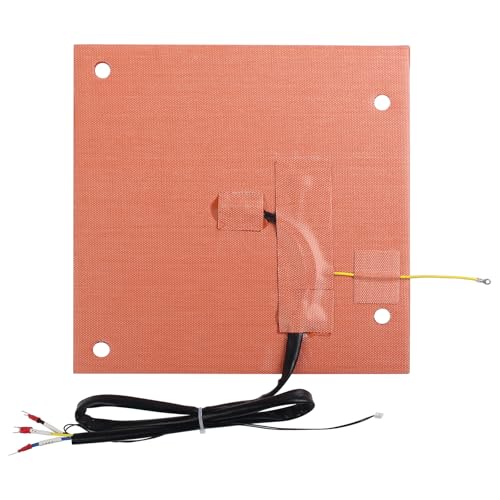 | Fast Heat | Voltage: 120 V (110 V option) | Power (Wattage): 800 W | Size (Footprint): 305 × 301 mm | CHECK ON AMAZON | Read Our Analysis |
| PI Heating Film 120W Round Polyimide Heater 160mm 12V |  | Compact Power | Voltage: 12 V DC | Power (Wattage): 120 W | Size (Footprint): 160 mm Ø (round) | CHECK ON AMAZON | Read Our Analysis |
| Funssor 8mm Aluminum CNC Heat Bed Kit (Full Kit) |  | All‑In‑One Kit | Voltage: 110 V / 220 V (dual voltage) | Power (Wattage): 1000 W | Size (Footprint): 260 × 260 mm | CHECK ON AMAZON | Read Our Analysis |
More Details on Our Top Picks
BCZAMD 120V 750W Heated Mat for 3D Printers (300×300 mm)
Looking for a reliable, high‑power bed that keeps a 300 mm × 300 mm print surface uniformly hot? The BCZAMD 120V 750W heated mat delivers exactly that. Its 300 × 300 mm silicone plate spreads heat evenly, while the built‑in NTC 100K thermistor lets you monitor temperature precisely. You’ll need a solid‑state relay, an insulation pad, and basic soldering skills to wire it to your Sidewinder X1 or CR‑10. If the bed stays cool, disconnect the SSR for a few seconds, reconnect, and test again. Persistent issues usually point to a faulty SSR, which you can replace. Aimengda’s mat weighs 1.12 lb and ships in a compact box.
- Voltage:120 V
- Power (Wattage):750 W
- Size (Footprint):300 × 300 mm
- Thermistor Type:NTC 100 K (3950)
- Material Construction:Silicone rubber
- Safety/Control Component:Solid‑State Relay (SSR) required
- Additional Feature:Strong adhesive backing
- Additional Feature:Screw‑hole mounting
- Additional Feature:Wide temperature range
FYSETC Anycubi Mega-S Silicone Heater Pad 350W 220x220mm Hotbed
If you’re upgrading an Anycubi Mega‑S or Mega‑Pro for reliable, even heat, the FYSETC silicone heater pad’s 350 W, 220 V rating and 218 × 218 mm footprint make it a perfect match. The pad uses nickel‑alloy resistance wire and I6 AWG silicone leads for uniform distribution, and a bimetal thermostat cuts power at 120 °C to prevent overheating. It ships with a solid‑state relay, fuse wire, and NTC 100 K thermistor, so wiring is straightforward: white leads power the heater, red/black signals control the SSR, and the fuse links the SSR to live mains. Install it on stock lattice glass or a new aluminum plate, but never cut the silicone.
- Voltage:220 V
- Power (Wattage):350 W
- Size (Footprint):218 × 218 mm (≈220 × 220 mm)
- Thermistor Type:NTC 100 K (3950)
- Material Construction:Silicone rubber with fiberglass cloth
- Safety/Control Component:Built‑in bimetal thermostat + SSR included
- Additional Feature:Built‑in bimetal thermostat
- Additional Feature:Includes solid‑state relay
- Additional Feature:Magnetic removable PEI plate
FYSETC 3D Printer Silicone Mat Heating Bed with Thermostat
The FYSETC silicone mat heating bed with built‑in bi‑metal thermostat is perfect for anyone who wants fast, uniform heat on a K1 Max without fiddling with complex wiring. It delivers 800 W at 120 V, reaching 100 °C in roughly ten minutes, and cuts off at 120 °C for safety. Its strong back adhesive and sealed edges keep it firmly in place, so you won’t need to read‑mount it later. You’ll need a solid‑state relay (not included) to power it, and the 18 Ω resistance works well with most controllers. The 11.8 × 11.8 inch silicone mat fits the K1 Max bed exactly, providing even temperature distribution for reliable prints.
- Voltage:120 V (110 V option)
- Power (Wattage):800 W
- Size (Footprint):305 × 301 mm
- Thermistor Type:NTC 100 K (3950)
- Material Construction:Silicone rubber
- Safety/Control Component:Built‑in bimetal thermostat (SSR not included)
- Additional Feature:Over‑temp cut‑off at 120 °C
- Additional Feature:Includes high‑temp silicone glue
- Additional Feature:Fast 100 °C in 10 min
PI Heating Film 120W Round Polyimide Heater 160mm 12V
Professional hobbyists and small‑shop professionals will find the PI Heating Film 120W Round Polyimide Heater 160mm 12V the ideal upgrade for a 3D‑printer hot bed, thanks to its flexible, adhesive‑backed design that snaps onto the existing surface and delivers fast, even heat up to 150 °C. You’ll appreciate its 120 W, 12 V output, which brings the bed to temperature in seconds and holds it steady, minimizing warping and boosting first‑layer adhesion. The polyimide film resists cracking and degradation, while the metal‑foil element ensures efficient conduction. Installation is tool‑free; just peel and stick. At 160 mm diameter and weighing 2.46 oz, it’s lightweight yet durable, fitting most printer sizes without extra components.
- Voltage:12 V DC
- Power (Wattage):120 W
- Size (Footprint):160 mm Ø (round)
- Thermistor Type:Not specified (no thermistor)
- Material Construction:Polyimide film
- Safety/Control Component:No thermostat; relies on external control
- Additional Feature:Flexible polyimide construction
- Additional Feature:Round 160 mm shape
- Additional Feature:Adhesive backing for tool‑free install
Funssor 8mm Aluminum CNC Heat Bed Kit (Full Kit)
Looking for a heat bed that eliminates warping while cutting preheat time? The Funssor 8 mm Aluminum CNC Heat Bed Kit gives you a flat, ultra‑stable surface and a fast‑heating silicone pad that works on 110 V or 220 V. Its CNC‑machined 8 mm alloy plate stays level within 0.1 mm, so PLA, ABS, and PETG stick without shifting. The full kit adds a PEI texture sheet for easy part removal. Wiring is simple: connect red and blue to the 220 V pads, or use the adapter for 110 V. No drilling or trimming’s required for Anycubic Kobra S1/S1C.
- Voltage:110 V / 220 V (dual voltage)
- Power (Wattage):1000 W
- Size (Footprint):260 × 260 mm
- Thermistor Type:NTC 100 K (3950)
- Material Construction:Aluminum alloy base + silicone pad
- Safety/Control Component:Built‑in bimetal thermostat + SSR (voltage‑specific wiring)
- Additional Feature:CNC‑machined 8 mm aluminum
- Additional Feature:Dual‑voltage (110 V/220 V) support
- Additional Feature:PEI texture sheet included
Factors to Consider When Choosing Heated Bed Upgrades for Even Temperature Distribution
When you pick a heated bed upgrade, start by checking the material’s conductivity to ensure heat spreads evenly. Make sure the power requirement matches your printer’s supply and that the bed size fits your build area. Finally, verify precise thermistor placement and a flat surface for consistent temperature control.
Material Conductivity
Maximizing thermal conductivity in the heater material is key to spreading heat evenly across the print bed and eliminating cold spots. You’ll notice that silicone heater pads with nickel‑alloy resistance wires deliver a smoother temperature curve than laminated films, because the alloy’s high conductivity bridges gaps quickly. Polyimide (PI) heater films also perform well, but they depend on flawless film uniformity and solid bonding to avoid localized hot spots. Look for units that integrate an NTC 100 K thermistor; its precise feedback lets the controller keep the whole surface at the same temperature. Dual‑layer or composite designs—heater element, adhesive backing, and insulation—further curb heat loss, ensuring a steady, uniform heat front across the bed.
Power Requirement Matching
If you match the bed’s power draw to your printer’s supply and wiring, you’ll keep the temperature uniform and avoid overloading the electronics. First, check the printer’s voltage rating—most boards handle 110 V or 220 V, but a 350 W‑800 W bed must match that level. Next, calculate the heater’s resistance; a 120 V, 800 W pad typically sits around 18 Ω, ensuring even heat flow. Choose a silicone pad with consistent resistance across its surface to prevent thermal gradients. Install a solid‑state relay (SSR) sized for the maximum current and use thick, low‑resistance cables to cut voltage drop at the edges. Finally, opt for a bed with an integrated NTC 100 K sensor or thermostat; it monitors local temperature and throttles power before hotspots form, delivering a stable, uniform heat across the whole build area.
Bed Size Compatibility
Why does bed size matter for uniform heat? Because the heater must cover the entire print area; any mismatch creates cold edges. Choose a heated mat that matches or slightly exceeds your printer’s dimensions—220 × 220 mm, 300 × 300 mm, etc.—so the element spans the whole surface. For square beds, align the heater’s edges with the bed’s corners to avoid temperature loss at the sides. Look for units with a continuous heating element and a reliable adhesion backing; this prevents hot spots at corners and uneven gradients. If you move to a larger bed, expect a higher wattage rating or better insulation to keep ramp‑up times and uniformity comparable to smaller setups. Finally, double‑check that mounting holes and attachment methods line up perfectly, eliminating gaps that could cause thermal inconsistencies.
Thermistor Placement Accuracy
Where should you position the thermistor for truly even heating? Aim for a spot directly under the heating element, ideally near the bed’s center. This location gives the most representative temperature reading and avoids the edges where heat loss skews data. Use an NTC 100K thermistor, but keep it away from hot spots and peripheral zones that could cause false spikes. Mount the sensor at a consistent height and secure it with heat‑resistant adhesive so it won’t drift when the bed flexes. Insulate the thermistor from ambient drafts; a thin silicone or ceramic sleeve works well. Ensure wiring doesn’t shield the sensor, because any obstruction creates gradients and reduces accuracy. Proper placement and stable mounting keep your printer’s temperature control tight and your prints uniform.
Surface Flatness Assurance
How can you guarantee a perfectly flat printing surface while still achieving even heat across the bed? Choose a heater with uniform thickness—large‑area silicone or film heaters spread heat evenly and prevent hot‑spot formation. Ensure the mounting method is precise: use a strong, even adhesive backing so the heater stays flush and maintains full contact with the build plate. Look for built‑in thermostats or bi‑metal cutoffs that lock the temperature at a safe limit (e.g., 120 °C) to avoid localized overheating. A dedicated heat‑bed design with consistent resistance and carefully routed wiring reduces temperature drops, supporting a uniformly flat, stable surface. These steps together give you a level bed that delivers consistent temperature across the entire print area.
Frequently Asked Questions
Do These Heated Beds Work With 24 V Power Supplies?
Yes, you can run those heated beds on a 24 V supply, but make sure the bed’s wattage matches the supply’s current rating, and use a proper MOSFET or driver to avoid overheating.
Can I Replace the Stock Bed Without Modifying My Printer Firmware?
Yes, you can swap the stock bed for a compatible aftermarket one without touching firmware, as long as the new heater’s voltage and resistance match your printer’s existing power supply and controller settings.
What Is the Recommended Insulation Material for These Heater Kits?
You should use high‑temperature silicone foam or 1‑inch ceramic fiber board; both handle 200 °C, resist warping, and keep heat where you need it, giving you consistent, even bed temperatures.
How Does Ambient Room Temperature Affect Bed Performance?
You’ll notice colder rooms cause slower heat‑up and higher power draw, while warm rooms let the bed reach target temperature faster and maintain steadier stability, so ambient temperature directly impacts heating efficiency and uniformity.
Are There Any Safety Certifications Required for Commercial Use?
You’ll need UL 60950‑1 or IEC 60601‑1 certification for commercial heated beds, plus CE marking in Europe and FCC compliance in the US. Verify that the manufacturer provides documented test reports and safety declarations.



